
Blog post: Making our services more consistent: helping users complete forms
Forms are often the main way people interact with our services. Whether applying for a permit or reporting an incident, their experience is often shaped by how clear and easy our forms are to use.
We are improving our forms using the GOV.UK design system and Welsh Government digital service standards. These standards help people complete our forms with ease and with fewer errors.
Using a more consistent approach
Having a more consistent approach across our forms means using proven, user-tested design patterns as a starting point.
This helps us create forms that are clear, consistent and accessible for all users.
We aim for the following when designing forms:
- consistency across services - users do not need to relearn how each form works
- fewer incomplete applications - clear questions and good error messages reduce mistakes
- less avoidable contact - if we explain what we need up front, users are less likely to contact us and ask for help
We also provide clear up front information on a ‘before you start’ page. This helps the user know what information they will need to submit before they even start the form.
Our form patterns
We have introduced many standard patterns over the years. Using standard patterns in forms is important because they create consistency and familiarity.
We haven’t stop there though, we have started improving other parts of our forms as well, such as:
Save and come back later feature
Some of our forms can take a while to complete. Users can save their progress and come back later if they need to, especially if they cannot complete the form in one go.
We’ve written clear, simple content to show the user how this works.
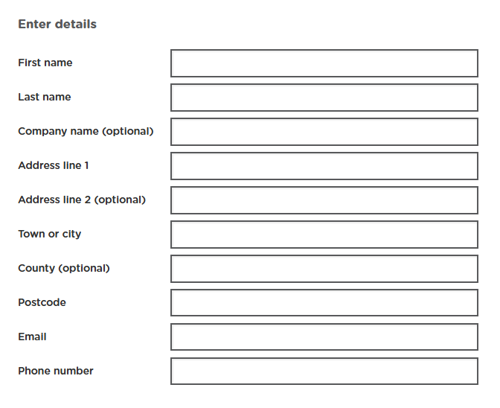
Address, email and phone number fields
We standardised how the address, email, and phone number fields are now shown. We have made them consistent to reduce confusion.
We also removed the unnecessary ‘title’ field.
Data protection page
Our forms used lots of different data protection messages, creating inconsistency for users. We standardised these messages and reduced the content on the data protection page to two-lines.
This is what our data protection page looks like now:
We will process the information provided by you in line with the Data Protection legislation (opens in new tab)
Information on how we manage, store, and use your data, can be found in our privacy policy (opens in new tab)
Simple and consistent declaration
We simplified the form declaration page by asking users if they agree to a short set of clear statements. The Passport Office uses this approach.
Users now understand what they are agreeing to, reducing unnecessary reading.
This is what our declaration page looks like now:
By agreeing, you confirm that:
- the information you have given is correct
- you have not knowingly made a false or misleading statement
If you give false or misleading information, we may prosecute you.
We now have a very simple ‘I agree’ check box that the user ticks to make sure they understand the statement.
Confirmation email
Users were often unsure if we had received their form. We are now introducing a clear confirmation page for every one of our forms to end this confusion.
This page confirms to the user that we have received their form and explains what happens next.
We have also added extra information for the user, such as turnaround times and any payments needed.
Regular form maintenance
In the last year we’ve audited over 100 forms. Regular form maintenance and reviews of forms is very important.
As well as adding many standard patterns to most forms, we have also:
- made sure links open in a new tab, so users don’t get kicked out of the form
- changed the way users can upload documents. We now allow up to 10 uploads per question, with a 50MB limit per file
- made sure all questions are mandatory and marked non-mandatory questions with ‘optional’ text. This also complies with accessibility guidance
- checked the Welsh and English versions of our forms to ensure consistency
Patterns and functionality we are working on next
Although we have made some good progress improving our forms, there is much more to do.
Next we are working on:
- controls and navigation - moving the back button to the top of the page. This is more consistent with how user interact with forms and online content
- form design - expanding our question library to help form designers use established patterns
- error messages - making error messages nice and clear by improving how they look
- conditional logic - showing follow-up questions on the same page based on a user’s answers
- language toggle - allowing users to switch between Welsh and English at any point throughout the form
- accessibility - making sure links contain enough colour contrast against the background. This means using clear focus and hover states so users can identify when text is a link
Continuous improvement
We are have been working hard to improve our forms. It’s important that we do this because it helps us improve how we work and helps us adapt to change over time.
Small, incremental improvements are less risky than big, sudden changes. We identify problems and fix them before they escalate.
We continue to improve our forms through:
- user research
- accessibility audits
- user feedback and data
- feedback from subject matter experts
Good forms are not static. We iterate and improve them over time using evidence, instead of assumptions.